Restaurant API to Salesforce: sync new restaurant leads
Sync restaurants that are about to open into Salesforce Leads with Python: a restaurant API call, an External ID field, and a bulk upsert that never creates duplicates.
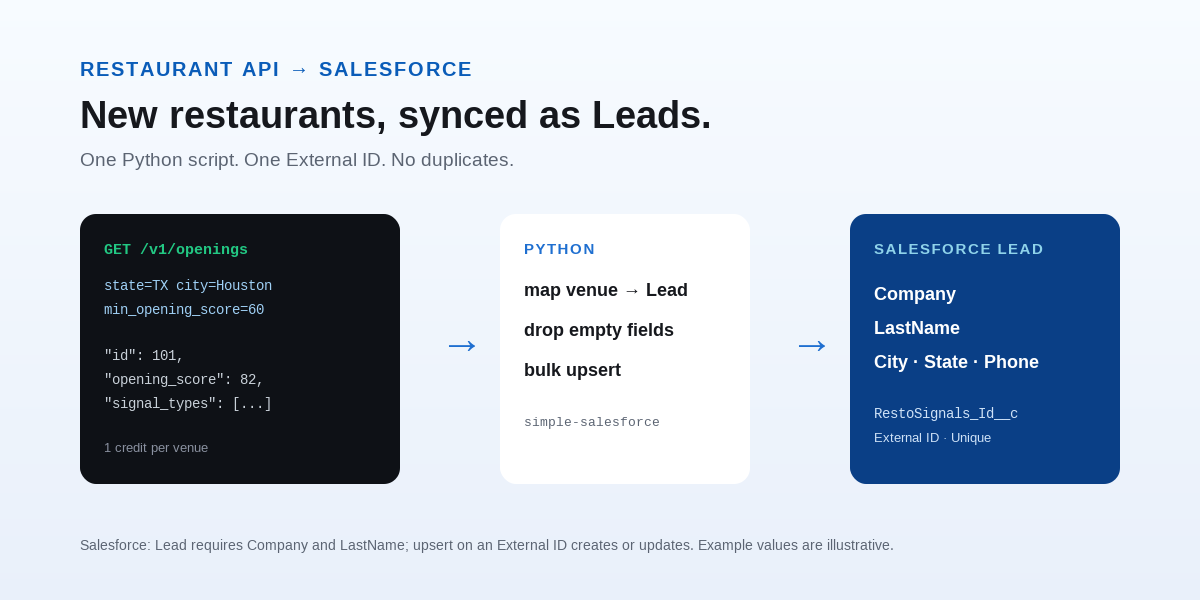
Your reps work out of Salesforce. New restaurants show up in public filings months before they open.
The gap between the two is a 60-line Python script.
To sync a restaurant API into Salesforce, call the API for new restaurant openings in your territory, map each venue to a Lead, and upsert on a custom External ID field so reruns update records instead of duplicating them. This guide does it with the RestoSignals restaurant API and the simple-salesforce library, with code you can run today.
I run RestoSignals, whose API fuses liquor-license, food-permit and new-business filings into one scored venue. On November 26, 2026 it held 38,463 venues built from 167,949 public signals.
What does the restaurant API return?
The RestoSignals restaurant API returns restaurants, bars and cafés that are about to open, as JSON. GET /v1/openings filters by state, city, signal type and a minimum opening_score from 0 to 100. Each venue has a stable id, the business name, address, status, the filings behind it, and an owner contact block on paid plans. One credit buys one returned venue.
Here’s the shape of one venue, trimmed to the fields this sync uses:
{
  "id": 101,
  "business_name": "BAYOU KITCHEN LLC",
  "dba": "Bayou Kitchen",
  "address": "100 MAIN ST",
  "city": "Houston",
  "state": "TX",
  "opening_score": 82,
  "status": "pre_opening",
  "signal_types": ["liquor", "business"],
  "earliest_signal_date": "2026-10-02",
  "latest_signal_date": "2026-11-20",
  "contact": { "owner_name": "Maria Lopez Garza", "phone": "713-555-0100" }
}
That record is an illustration of the shape, not a real venue. The fields and their types come straight from the API’s reference docs.
Three fields matter most for Salesforce:
- id is stable, so it becomes your External ID.
- opening_score tells reps who to call first.
- contact holds the owner details on paid plans. Free keys get
{"locked": true, "available": true}instead.
Why use a restaurant API instead of a CSV import?
A restaurant API keeps Salesforce current without anyone re-importing files. New filings land in the public record every day, and a scheduled script pulls only what changed. A CSV import goes stale the day after you load it, and every re-import risks duplicates unless someone dedupes by hand.
Three practical differences:
- Freshness. The API reflects filings as states publish them. A spreadsheet reflects the day someone downloaded it.
- No duplicates. An upsert on an External ID updates existing leads. A CSV import creates new ones unless you map IDs carefully.
- Pay per lead. You choose the filters and the limit. Each returned venue costs 1 credit, and an empty result costs nothing.
How do you set up Salesforce for the sync?
You need one custom field on the Lead object before the first run: a Text field marked External ID and Unique that stores the API’s venue id. That field is what makes the sync safe to run every day. Salesforce’s REST guide says an upsert creates a record when the external ID isn’t matched and updates it when it’s matched once.
In Salesforce Setup:
- Open Object Manager and pick Lead.
- Go to Fields & Relationships, then New.
- Choose Text, name it
RestoSignals Id, length 20. The API name becomesRestoSignals_Id__c. - Tick External ID and Unique.
- Save, and add it to the page layout if you want reps to see it.
Why Unique matters: Salesforce’s upsert docs say that if an external ID is matched more than once, the call fails with an HTTP 300 error and lists the matches. Unique makes that impossible.
Then mind the required fields. Salesforce’s Lead object reference marks both Company and LastName as required. The script below always fills both, even when a venue has no owner name yet.
How do you get a restaurant API key?
Sign up at restosignals.com with your email for a key with 100 free credits, no card. For a quick test, POST https://api.restosignals.com/v1/register returns a 15-credit trial key without an email. Send the key in the X-API-Key header on every call, never in the URL.
Check your filters before you wire up Salesforce:
curl -H "X-API-Key: pk_YOUR_KEY" \
  "https://api.restosignals.com/v1/openings?state=TX&city=Houston&min_opening_score=60&limit=5"
Live states today: NY, TX, IL and CA have the deepest data, with liquor, permit and business signals fused. OR, CO and WA are liquor-only for now. The free MCP coverage tool, or the coverage section of the docs, shows the current list.
The sync script
The script does four things:
- Pulls new openings with your filters.
- Maps each venue to a Lead.
- Drops empty fields.
- Bulk-upserts the batch on
RestoSignals_Id__c.
I tested it against the API’s real response shape, including a locked contact block, an empty result and an out-of-credits response.
"""Sync new restaurant openings from the RestoSignals restaurant API into Salesforce Leads.

pip install requests simple-salesforce
Env: RESTOSIGNALS_KEY, SF_USERNAME, SF_PASSWORD, SF_TOKEN
Needs a custom Lead field RestoSignals_Id__c (Text, External ID, Unique).
"""
import os

import requests
from simple_salesforce import Salesforce

API = "https://api.restosignals.com/v1/openings"
FILTERS = {"state": "TX", "city": "Houston", "min_opening_score": 60, "limit": 25}


def fetch_openings(api_key, filters):
    r = requests.get(API, params=filters, headers={"X-API-Key": api_key}, timeout=30)
    if r.status_code == 402:
        raise SystemExit("Out of credits: top up at https://restosignals.com/pricing/")
    r.raise_for_status()
    return r.json()["openings"]


def to_lead(v):
    contact = v.get("contact") or {}
    owner = contact.get("owner_name") or ""          # only on paid plans; locked on free keys
    first, _, last = owner.strip().rpartition(" ")
    return {
        "RestoSignals_Id__c": str(v["id"]),
        "Company": (v.get("dba") or v["business_name"])[:255],
        "FirstName": first[:40] or None,
        "LastName": (last or "Owner")[:80],          # LastName is required on a Lead
        "Street": v.get("address"),
        "City": v.get("city"),
        "State": v.get("state"),
        "Phone": contact.get("phone"),
        "Email": contact.get("email"),
        "Website": contact.get("website"),
        "Description": (f"Opening score {v['opening_score']} ({v['status']}). "
                        f"Signals: {', '.join(v.get('signal_types') or [])}. "
                        f"First filing {v.get('earliest_signal_date')}, latest {v.get('latest_signal_date')}."),
    }


def main():
    openings = fetch_openings(os.environ["RESTOSIGNALS_KEY"], FILTERS)
    if not openings:
        print("No new venues for these filters (no credits used).")
        return
    leads = [{k: v for k, v in to_lead(o).items() if v is not None} for o in openings]
    sf = Salesforce(username=os.environ["SF_USERNAME"], password=os.environ["SF_PASSWORD"],
                    security_token=os.environ["SF_TOKEN"])
    results = sf.bulk.Lead.upsert(leads, "RestoSignals_Id__c", batch_size=200)
    created = sum(1 for r in results if r.get("created"))
    failed = [r for r in results if not r.get("success")]
    print(f"{len(leads)} venues synced: {created} created, {len(leads) - created - len(failed)} updated, {len(failed)} failed")
    for r in failed:
        print("  error:", r.get("errors"))


if __name__ == "__main__":
    main()
Run it:
pip install requests simple-salesforce
export RESTOSIGNALS_KEY=pk_YOUR_KEY SF_USERNAME=you@company.com SF_PASSWORD='...' SF_TOKEN='...'
python sync_restaurant_leads.py
# 25 venues synced: 25 created, 0 updated, 0 failed
Run it again tomorrow and venues you already have come back as updated, not duplicated.
How does the field mapping work?
The script maps each venue to standard Lead fields. It puts the trade name in Company and the owner’s name in FirstName and LastName, and writes the score, status and filings into Description so reps see why the lead exists. Empty values are dropped before the upsert, so a locked contact on a free key never blanks out data you already have.
| Restaurant API field | Salesforce Lead field | Notes |
|---|---|---|
| id | RestoSignals_Id__c | External ID, Unique |
| dba, or business_name | Company | Required; trade name first |
| contact.owner_name | FirstName + LastName | LastName falls back to “Owner” |
| address, city, state | Street, City, State | Premises address |
| contact.phone / email / website | Phone / Email / Website | Paid plans, where the filing has them |
| opening_score, status, signal_types, dates | Description | Why this lead, in one line |
Two choices worth explaining.
Why “Owner” as the LastName fallback? LastName is required. A venue found through a liquor application may not show an owner name to a free key. “Owner” keeps the record valid, and the next paid run fills in the real name on the same record.
Why not LeadSource? LeadSource is a picklist, and many orgs restrict its values. Add a “RestoSignals” value in Setup first if you want to report on it, then add "LeadSource": "RestoSignals" to the mapping.
How do you log in to Salesforce from Python?
The script logs in with a username, password and security token through simple-salesforce, the most common Python client for the Salesforce API. Its README shows exactly this login: Salesforce(username=..., password=..., security_token=...). The README says the security token comes with a password change, or from Reset My Security Token in your personal settings.
If your org doesn’t allow username-and-password logins for the API, simple-salesforce also accepts a session id, a Connected App consumer key and secret, or a JWT private key. Only the Salesforce(...) line changes; the rest of the script stays the same.
Keep credentials out of the code. Environment variables work, and so do a secrets manager or GitHub Actions secrets.
How do you run the sync every day?
Run the script once a day on any scheduler: cron on a server, Windows Task Scheduler on a desktop, or a GitHub Actions workflow on a daily schedule. Each run only pays for the venues it returns, and the External ID means repeated venues update instead of duplicating.
A GitHub Actions version, with credentials stored as repository secrets:
name: restaurant-leads-to-salesforce
on:
  schedule:
    - cron: "0 13 * * *"
jobs:
  sync:
    runs-on: ubuntu-latest
    steps:
      - uses: actions/checkout@v4
      - run: pip install requests simple-salesforce
      - run: python sync_restaurant_leads.py
        env:
          RESTOSIGNALS_KEY: ${{ secrets.RESTOSIGNALS_KEY }}
          SF_USERNAME: ${{ secrets.SF_USERNAME }}
          SF_PASSWORD: ${{ secrets.SF_PASSWORD }}
          SF_TOKEN: ${{ secrets.SF_TOKEN }}
Cost control is simple. With limit: 25, a daily run costs at most 25 credits, about 750 a month at the ceiling. An empty day costs nothing. When credits run out, the API returns HTTP 402 and the script stops with the pricing link. Nothing is billed automatically.
Which filters should a sales team use?
Start narrow and widen once reps keep up. The filters that matter most:
- state and city: your territory.
- min_opening_score: 60 or higher means several independent filings and recent activity. Drop to 40 for more volume.
- signal_type:
liquorfor beverage and bar vendors,food_permitfor kitchen equipment and food-safety services. - since: an ISO date, to pull only venues whose latest filing is on or after it.
Different teams want different slices. A beverage distributor might sync liquor signals statewide, while a POS reseller syncs every signal type in two cities. See the buyer guides for examples.
What if the sync fails?
Most failures come from four places: the API key, credits, the Salesforce login, or the External ID field. The API answers with standard HTTP codes, and each failed Salesforce row comes back with its own error list, which the script prints.
- HTTP 401 from the restaurant API: the key is missing or wrong. Check
RESTOSIGNALS_KEYand that it goes in theX-API-Keyheader. - HTTP 402: out of credits. The script stops and prints the pricing link.
- Salesforce login error: a wrong password or security token, or your org doesn’t allow password logins for the API. Reset the token, or switch to a Connected App login.
- “The requested resource does not exist” or an unknown field: the External ID field name doesn’t match. The API name must be exactly
RestoSignals_Id__c, or change it in the script. - REQUIRED_FIELD_MISSING: a validation rule in your org requires another field. Add it to
to_lead().
Fix the cause and rerun. The upsert is safe to repeat.
Frequently asked questions
Is there a restaurant API that works with Salesforce?
Any REST API can feed Salesforce through a short script. The RestoSignals restaurant API returns restaurants and bars that are about to open, scored 0 to 100, as JSON. A Python script with the simple-salesforce library can upsert them into Salesforce Leads, using the venue id as an External ID so leads never duplicate.
How do I avoid duplicate leads when I import restaurants into Salesforce?
Create a custom Lead field marked External ID and Unique, store the API’s venue id in it, and upsert instead of insert. Salesforce’s REST API creates a record when the external ID isn’t matched and updates it when it’s matched once, so running the sync every day updates existing leads instead of creating copies.
Which Salesforce Lead fields are required?
Salesforce’s object reference marks Company and LastName as required on a Lead. When a restaurant has no owner name yet, the sync uses the venue name as Company and a placeholder such as Owner as LastName, so the record still saves.
How much does the restaurant API cost to run daily?
One credit per returned venue. With limit set to 25 and a daily schedule, a full month is at most about 750 credits, and an empty day costs nothing. Credits stop at zero with an HTTP 402 instead of billing you, and new accounts start with 100 free credits.
Do I get the restaurant owner’s phone number in Salesforce?
On paid plans, each venue’s contact block includes the owner name and, where the public filing has them, a phone number and mailing address. Free keys return the contact as locked. The script maps whatever is present and leaves empty fields out.
Can I use Salesforce Flow or Zapier instead of Python?
Yes. Any tool that can call a REST API with a header can pull the same data. Python with simple-salesforce is the simplest way to get a true upsert on an External ID with no per-task fees, which is why this guide uses it.
Ship the first sync today
Create the External ID field, get a free key, and run the script with limit: 5 against your own territory. Check the five new leads in Salesforce, then raise the limit and schedule it.
Want it in a different tool? There are setup guides for HubSpot, Google Sheets, n8n and Zapier, plus the full API reference and a quickstart.
Mukul Dutt is the founder of RestoSignals, which turns public liquor-license, food-permit and business filings into scored restaurant opening leads. Salesforce behavior is from Salesforce’s Lead object reference and REST API upsert guide, read November 26, 2026. The simple-salesforce login and upsert calls are from the library’s README (version 1.12.11). Venue and signal counts are from the RestoSignals database on November 26, 2026. The script was tested against the API’s documented response shape.
FAQ
Is there a restaurant API that works with Salesforce?
Any REST API can feed Salesforce through a short script. The RestoSignals restaurant API returns restaurants and bars that are about to open, scored 0 to 100, as JSON. A Python script with the simple-salesforce library can upsert them into Salesforce Leads, using the venue id as an External ID so leads never duplicate.
How do I avoid duplicate leads when I import restaurants into Salesforce?
Create a custom Lead field marked External ID and Unique, store the API's venue id in it, and upsert instead of insert. Salesforce's REST API creates a record when the external ID isn't matched and updates it when it's matched once, so running the sync every day updates existing leads instead of creating copies.
Which Salesforce Lead fields are required?
Salesforce's object reference marks Company and LastName as required on a Lead. When a restaurant has no owner name yet, the sync uses the venue name as Company and a placeholder such as Owner as LastName, so the record still saves.
How much does the restaurant API cost to run daily?
One credit per returned venue. With limit set to 25 and a daily schedule, a full month is at most about 750 credits, and an empty day costs nothing. Credits stop at zero with an HTTP 402 instead of billing you, and new accounts start with 100 free credits.
Do I get the restaurant owner's phone number in Salesforce?
On paid plans, each venue's contact block includes the owner name and, where the public filing has them, a phone number and mailing address. Free keys return the contact as locked. The script maps whatever is present and leaves empty fields out.
Can I use Salesforce Flow or Zapier instead of Python?
Yes. Any tool that can call a REST API with a header can pull the same data. Python with simple-salesforce is the simplest way to get a true upsert on an External ID with no per-task fees, which is why this guide uses it.
Find venues opening near you
100 free leads, no card. One platform for restaurants & bars about to open.