Restaurant API to Slack: daily new-restaurant alerts
Post new restaurant openings to a Slack channel every weekday morning: one restaurant API call, a Slack incoming webhook and a 100-line Python script.
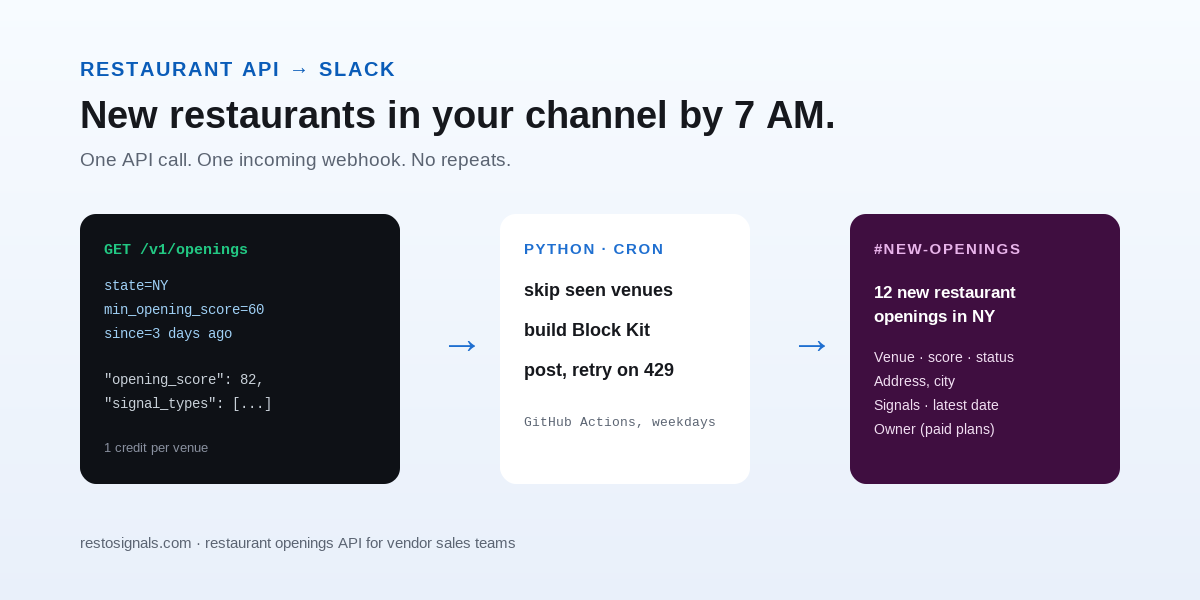
Your sales team already lives in Slack. New restaurants show up in public filings months before they open.
So put the filings in the channel.
To post new restaurant openings to Slack, create an incoming webhook for a channel, call a restaurant API for venues with fresh filings in your territory, and send them as one Block Kit message each weekday morning. This guide does it with the RestoSignals restaurant API, about 100 lines of Python and a free GitHub Actions schedule. I tested the code end to end before publishing.
I run RestoSignals, whose API fuses liquor-license, food-permit and new-business filings into one scored venue. On November 27, 2026 it held 38,642 venues across seven states, and 319 of them scored 80 or higher.
Why send new restaurant leads to Slack at all?
Timing decides who wins a new restaurant account. In a survey published by Preopening Restaurants Resource, 71% of 220 restaurant professionals said they start choosing main vendors more than 90 days before opening. A Slack alert puts each new filing in front of a rep the morning it lands, while the owner is still picking suppliers.
That survey ran on Restaurant Technology News as a sponsored post, and the publisher sells pre-opening leads too. So read it as a direction, not gospel.
The rest of it points the same way. 64% said they finalize suppliers before any public announcement. 76% said they aren’t open to new-vendor pitches in the last 30 days before opening.
Speed matters inside that window too. Harvard Business Review’s “The Short Life of Online Sales Leads” looked at 1.25 million leads. Firms that reached out within an hour were nearly 7 times as likely to qualify the lead as firms that waited one hour more.
A spreadsheet export someone opens on Friday doesn’t get you that. A message in the channel your reps already read at 7 AM does.
What does the restaurant API return?
The RestoSignals restaurant API returns restaurants, bars and cafés that are about to open, as JSON. GET /v1/openings filters by state, city, signal type, a minimum opening_score from 0 to 100, and since, the earliest latest-signal date. Each venue has a stable id, name, address, status, filing types, and an owner contact block on paid plans. One returned venue costs one credit.
Here’s one venue, trimmed to the fields the Slack message uses:
{
  "id": 101,
  "business_name": "BAYOU KITCHEN LLC",
  "dba": "Bayou Kitchen",
  "address": "100 MAIN ST",
  "city": "BROOKLYN",
  "state": "NY",
  "opening_score": 82,
  "status": "pending",
  "signal_types": ["liquor_license", "food_permit"],
  "latest_signal_date": "2026-11-25",
  "contact": {"owner_name": "...", "phone": "...", "email": null}
}
The id matters most. It’s how the script remembers what it already posted.
The response also carries credits_remaining, which the message shows in its footer so nobody gets surprised by an empty balance.
How do you create a Slack incoming webhook?
A Slack incoming webhook is a private URL that posts to one channel. Go to api.slack.com/apps, click Create New App, pick From scratch, and choose your workspace. Under Features, open Incoming Webhooks, switch it on, click Add New Webhook to Workspace, and pick the channel, for example #new-openings. Slack gives you a URL that starts with hooks.slack.com/services.
That URL is a password. Anyone who has it can post to your channel, so keep it out of your code and out of Git.
Test it before writing anything else:
curl -X POST -H "Content-Type: application/json" \
  -d '{"text":"Restaurant alerts are wired up."}' \
  "$SLACK_WEBHOOK_URL"
Slack answers ok and the message shows up in the channel. Slack’s guide to sending messages with incoming webhooks covers the same steps with screenshots.
How do you get a restaurant API key?
Sign up at restosignals.com with your email for a key with 100 free credits, no card. For a quick test, POST https://api.restosignals.com/v1/register returns a 15-credit trial key without an email. Send the key in the X-API-Key header on every call, never in the URL.
Check your filters before you wire up Slack:
curl -H "X-API-Key: $RESTOSIGNALS_KEY" \
  "https://api.restosignals.com/v1/openings?state=NY&min_opening_score=60&limit=3"
If that returns three venues you’d want a rep to call, your filters are right.
What does the Slack alert script do?
The script asks the restaurant API for venues in your state with a signal in the last three days, drops any venue id it posted before, and sends the rest to Slack as one message. Each venue gets the name, score, status, address, signal types and, on paid plans, the owner contact. It retries when Slack rate-limits it and posts a warning when the key runs out of credits.
Save it as openings_to_slack.py:
"""Post new restaurant openings from the RestoSignals API to a Slack channel."""
import json
import os
import sys
import time
from datetime import date, timedelta
import requests
API_URL = os.environ.get("RESTOSIGNALS_API", "https://api.restosignals.com/v1/openings")
API_KEY = os.environ["RESTOSIGNALS_KEY"]
SLACK_URL = os.environ["SLACK_WEBHOOK_URL"]
SEEN_FILE = os.environ.get("SEEN_FILE", "seen.json")
FILTERS = {
"state": os.environ.get("STATE", "NY"),
"min_opening_score": int(os.environ.get("MIN_SCORE", "60")),
"since": (date.today() - timedelta(days=3)).isoformat(),
"limit": int(os.environ.get("LIMIT", "15")),
}
if os.environ.get("CITY"):
FILTERS["city"] = os.environ["CITY"]
def esc(text):
"""Slack mrkdwn needs &, < and > escaped."""
return str(text or "").replace("&", "&").replace("<", "<").replace(">", ">")
def load_seen():
try:
with open(SEEN_FILE) as f:
return set(json.load(f))
except (FileNotFoundError, ValueError):
return set()
def save_seen(ids):
with open(SEEN_FILE, "w") as f:
json.dump(sorted(ids)[-5000:], f)
def post_to_slack(payload):
for _ in range(3):
r = requests.post(SLACK_URL, json=payload, timeout=15)
if r.status_code == 429: # Slack allows about 1 message per second per channel
time.sleep(int(r.headers.get("Retry-After", "2")))
continue
if r.status_code != 200:
sys.exit(f"Slack said {r.status_code}: {r.text}")
return
sys.exit("Slack kept rate-limiting; try again later.")
def venue_block(v):
name = esc(v.get("dba") or v.get("business_name") or "Unnamed venue")
where = ", ".join(esc(x) for x in (v.get("address"), v.get("city"), v.get("state")) if x)
signals = ", ".join(v.get("signal_types") or []) or "filing"
lines = [f"*{name}* · score {v.get('opening_score')} · {esc(v.get('status') or '')}",
f"{where}",
f"Signals: {esc(signals)} · latest {v.get('latest_signal_date')}"]
c = v.get("contact") or {}
if not c.get("locked"):
who = " · ".join(esc(x) for x in (c.get("owner_name"), c.get("phone"), c.get("email")) if x)
if who:
lines.append(f"Owner: {who}")
return {"type": "section", "text": {"type": "mrkdwn", "text": "\n".join(lines)[:3000]}}
def main():
r = requests.get(API_URL, headers={"X-API-Key": API_KEY}, params=FILTERS, timeout=30)
if r.status_code == 402:
post_to_slack({"text": "RestoSignals: the API key is out of credits, so today's openings were skipped."})
sys.exit("Out of credits.")
r.raise_for_status()
data = r.json()
seen = load_seen()
fresh = [v for v in data["openings"] if v["id"] not in seen]
if not fresh:
print("Nothing new today.")
return
where = FILTERS.get("city") or FILTERS["state"]
blocks = [{"type": "header",
"text": {"type": "plain_text", "text": f"{len(fresh)} new restaurant openings in {where}"}}]
for v in fresh[:23]: # header + 23 x (venue + divider) + footer = 48 of Slack's 50 blocks
blocks += [venue_block(v), {"type": "divider"}]
more = f" · {len(fresh) - 23} more in your dashboard" if len(fresh) > 23 else ""
if data["count"] >= FILTERS["limit"]: # results come highest score first, so some may be cut
more += " · hit the limit: raise MIN_SCORE or add a CITY"
blocks.append({"type": "context", "elements": [{"type": "mrkdwn",
"text": f"RestoSignals · {data['credits_remaining']} credits left{more}"}]})
post_to_slack({"text": f"{len(fresh)} new restaurant openings in {where}", "blocks": blocks})
save_seen(seen | {v["id"] for v in fresh})
print(f"Posted {len(fresh)} openings to Slack.")
if __name__ == "__main__":
main()Run it once by hand:
pip install requests
export RESTOSIGNALS_KEY=pk_your_key
export SLACK_WEBHOOK_URL=https://hooks.slack.com/services/...
export STATE=NY
python openings_to_slack.py
Run it a second time and it prints “Nothing new today.” That’s the seen-file doing its job.
How does the Slack message stay inside Block Kit limits?
Slack caps a message at 50 blocks, a section’s text at 3,000 characters and a header at 150. The script spends one block on the header, two per venue (the venue plus a divider) and one on the footer, so it shows at most 23 venues, which is 48 blocks. Anything past 23 becomes a “more in your dashboard” note instead of a failed post.
The limits come from Slack’s Block Kit reference. Go over them and Slack rejects the whole message, not just the extra part.
Two other details keep the message from breaking:
- Escaping. Slack’s mrkdwn treats
&,<and>as control characters. A venue called “Bar <1> & Grill” would garble the message, soesc()escapes all three. - Plain text fallback. The top-level
textfield is what shows in phone notifications and in clients that can’t render blocks. The script always sends one.
How do you run it every weekday morning?
GitHub Actions can run the script on a cron schedule for free on a public repo, and within the included minutes on a private one. Store the API key and the Slack URL as repository secrets, schedule it for 11:30 UTC on weekdays, and cache seen.json between runs so the channel never repeats a venue.
Why 11:30 UTC? The RestoSignals daily refresh usually finishes in the afternoon UTC, so a morning run picks up everything filed the day before. It lands at 6:30 AM Eastern in winter, before reps start.
Save this as .github/workflows/openings-to-slack.yml:
name: openings-to-slack
on:
  schedule:
    - cron: "30 11 * * 1-5"   # 11:30 UTC, Monday to Friday
  workflow_dispatch:
jobs:
  post:
    runs-on: ubuntu-latest
    steps:
      - uses: actions/checkout@v4
      - uses: actions/setup-python@v5
        with:
          python-version: "3.12"
      - run: pip install requests
      - uses: actions/cache/restore@v4
        with:
          path: seen.json
          key: seen-${{ github.run_id }}
          restore-keys: seen-
      - run: python openings_to_slack.py
        env:
          RESTOSIGNALS_KEY: ${{ secrets.RESTOSIGNALS_KEY }}
          SLACK_WEBHOOK_URL: ${{ secrets.SLACK_WEBHOOK_URL }}
          STATE: NY
          MIN_SCORE: "60"
      - uses: actions/cache/save@v4
        if: hashFiles('seen.json') != ''
        with:
          path: seen.json
          key: seen-${{ github.run_id }}
The three-day since window is there on purpose. A weekday schedule skips Saturday and Sunday, so Monday’s run has to reach back to Friday. The seen-file stops the overlap from showing up twice.
Know three things about the GitHub schedule before you rely on it. GitHub’s docs say the shortest interval is every 5 minutes. Runs can start late when GitHub is busy. And in a public repo, scheduled workflows switch off after 60 days with no repository activity, so push a commit now and then.
Prefer cron on a server you already run? 30 11 * * 1-5 cd /opt/alerts && python3 openings_to_slack.py does the same job, and the seen-file just sits on disk.
Can the restaurant API push alerts to Slack instead?
Yes, on a paid plan. RestoSignals webhooks push the venues matching your filters right after each daily data refresh, with no schedule of your own to run. You can’t point that webhook at Slack directly, because Slack only accepts a text or blocks body and the RestoSignals webhook sends a count and a venues list. A 20-line relay, such as a Cloudflare Worker, reshapes it.
Here’s the relay. It checks a secret token in its own URL, since anyone could otherwise post to it:
const esc = (s) => String(s ?? "").replace(/&/g, "&").replace(/</g, "<").replace(/>/g, ">");
export default {
async fetch(request, env) {
const url = new URL(request.url);
if (request.method !== "POST" || url.searchParams.get("t") !== env.RELAY_TOKEN) {
return new Response("forbidden", { status: 403 });
}
const { count = 0, venues = [] } = await request.json();
const lines = venues.slice(0, 20).map((v) =>
`• *${esc(v.business_name)}*, ${esc(v.city)} ${esc(v.state)} · score ${v.opening_score} · ` +
`${esc((v.signal_types || []).join(", "))}`);
const more = count > 20 ? `\n…and ${count - 20} more on your dashboard` : "";
const text = `*${count} new restaurant openings matched your RestoSignals alert*\n${lines.join("\n")}${more}`;
const r = await fetch(env.SLACK_WEBHOOK_URL, {
method: "POST",
headers: { "Content-Type": "application/json" },
body: JSON.stringify({ text }),
});
return new Response(r.ok ? "ok" : "slack error", { status: r.ok ? 200 : 502 });
},
};Deploy it, set RELAY_TOKEN and SLACK_WEBHOOK_URL as Worker secrets, then register the relay with the API:
curl -X POST https://api.restosignals.com/v1/webhooks \
  -H "X-API-Key: $RESTOSIGNALS_KEY" -H "Content-Type: application/json" \
  -d '{"url":"https://your-relay.workers.dev/?t=YOUR_TOKEN","criteria":{"state":"TX","min_opening_score":60}}'
What about Slack Workflow Builder? Its webhook trigger needs a paid Slack plan, takes at most 20 variables, and doesn’t support nested JSON. A list of venues is nested JSON, so it’s the wrong tool here.
Daily digest or webhook push: which should you use?
Use the daily digest script unless you already pay for RestoSignals and want zero scheduling. The digest works with any key, including free credits, carries owner contacts on paid plans, and posts once at a time you choose. The webhook push needs a paid plan and a relay, and its message shows venue, score and signals without contacts.
| Daily digest script | Webhook push + relay | |
|---|---|---|
| RestoSignals plan | Any key, including the free 100 credits | Paid plan (webhooks are a paid feature) |
| Slack plan | Free works | Free works |
| When it posts | Once each weekday, at a time you pick | After each daily data refresh |
| Owner contact in message | Yes, on paid plans | No; venue, score and signals only |
| Repeat protection | seen.json | Each push only has new venues |
| Moving parts | One script, one cron | One Worker, one registered webhook |
Start with the digest. It’s free to try, it carries owner contacts on paid plans, and one predictable message a morning beats a channel that pings all day.
Which filters should a sales team use?
Use one channel per territory and set the filters to match what that team can actually sell into. Start with your state and a minimum opening_score of 60, which keeps venues with at least one strong filing. Add a city when one metro is all a rep covers, and raise the score to 80 when the channel gets too busy to read.
A few setups that work:
- Beverage distributor, one metro.
STATE=IL CITY=Chicago MIN_SCORE=60. Liquor filings are the signal a beverage rep cares about most. - POS reseller, whole state.
STATE=TX MIN_SCORE=80. Only venues with stacked filings, so reps call fewer, better leads. - Equipment dealer, several states. One workflow per state, each with its own channel and its own seen-file cache key.
Coverage today is New York, Texas, California and Illinois at depth, with Oregon, Colorado and Washington lighter. The openings map shows what each state holds.
What does it cost to run?
One credit per venue returned, and empty days cost nothing. With LIMIT at 15 and a weekday schedule, the most a month can use is about 330 credits. Credit packs start at 1,000 credits for $4 and never expire. GitHub Actions and Slack incoming webhooks are free at this volume.
One honest catch: the seen-file filters repeats after the API returns them, so a repeat still costs a credit. The three-day window means a venue can come back up to three times. If that bothers you, set since to one day and accept that Monday’s run will miss weekend filings.
When the balance hits zero, the API answers with a 402 instead of billing you. The script turns that into a Slack message, so the team knows why the channel went quiet.
What if the Slack alert stops posting?
Most failures show up in the GitHub Actions log, and each has a clear cause. An invalid_blocks or invalid_payload error from Slack means the message broke a Block Kit rule. A no_service error means the webhook was disabled or removed. A 402 from the API means you’re out of credits, and a quiet channel with a green run usually means nothing new matched your filters.
The quick checks, in order:
- “Nothing new today” every day. Lower MIN_SCORE or widen to the whole state, then run the curl test above.
- Slack says
no_service. The webhook was disabled or removed. Make a new one and update the secret. - Footer says “hit the limit”. Results come back highest score first, so lower-scored new venues got cut. Raise MIN_SCORE or add a CITY.
- The workflow stopped running. Check the Actions tab. A public repo with 60 quiet days gets its schedule switched off.
I tested this script against mock versions of the API and Slack before publishing. That included a forced 429, a second run that had to post nothing, 30 venues to check the 23-venue cap, and venue names with <, > and & in them.
Frequently asked questions
Can I send new restaurant openings to Slack automatically?
Yes. Create a Slack incoming webhook for the channel, then run a short script every weekday that calls a restaurant openings API and posts the new venues as one message. This guide uses the RestoSignals restaurant API, Python and a free GitHub Actions schedule, and the script skips venues it already posted.
Can I point the RestoSignals webhook straight at a Slack webhook URL?
No. A Slack incoming webhook only accepts a JSON body with a text or blocks field, and the RestoSignals webhook sends a count plus a venues array, so Slack rejects it with a no_text error. Put a 20-line relay in between, such as a Cloudflare Worker, that turns the venue list into a Slack message.
How many credits does a daily Slack alert use?
One credit per returned venue, and empty days cost nothing. With LIMIT at 15 and a weekday schedule, the most a month can use is about 330 credits. A 1,000-credit pack costs $4 and never expires, so a daily channel alert costs a few dollars a month at most.
What is the rate limit on Slack incoming webhooks?
Slack allows about one message per second per channel for incoming webhooks and returns HTTP 429 with a Retry-After header when you go over. A daily alert sends one message, so you won’t hit it, but the script still waits and retries on a 429.
Can I use Slack Workflow Builder instead of a script?
Only for flat data. Workflow Builder webhook triggers need a paid Slack plan, accept up to 20 variables and don’t support nested JSON, while a restaurant API returns a list of venues. A script or a small relay is simpler and works on the free Slack plan.
Does the Slack alert include the owner’s phone number?
On a paid RestoSignals plan, each venue carries an owner contact block with the owner name and, where the public filing has them, a phone number and email. The script prints whatever is present. Free keys return the contact as locked, so the message shows the venue, score and signals only.
Post the first alert today
Make the webhook, get a free key, and run the script once with LIMIT=5 for your own state. If the five venues in the channel look like leads your reps would call, add the workflow and let it run tomorrow morning.
Want the same leads somewhere else? There are guides for Salesforce, HubSpot, Google Sheets, n8n and Zapier, plus the full API reference and a quickstart.
Mukul Dutt is the founder of RestoSignals, which turns public liquor-license, food-permit and business filings into scored restaurant opening leads. Slack behavior is from Slack’s incoming webhook guide, rate-limit page, Block Kit reference and Workflow Builder help article, read November 27, 2026. Scheduling limits are from GitHub’s Actions documentation. Venue counts are from the RestoSignals database on November 27, 2026. The script and the relay were tested against mock API and Slack servers that enforce the documented response shape, block limits and rate limiting.
FAQ
Can I send new restaurant openings to Slack automatically?
Yes. Create a Slack incoming webhook for the channel, then run a short script every weekday that calls a restaurant openings API and posts the new venues as one message. This guide uses the RestoSignals restaurant API, Python and a free GitHub Actions schedule, and the script skips venues it already posted.
Can I point the RestoSignals webhook straight at a Slack webhook URL?
No. A Slack incoming webhook only accepts a JSON body with a text or blocks field, and the RestoSignals webhook sends a count plus a venues array, so Slack rejects it with a no_text error. Put a 20-line relay in between, such as a Cloudflare Worker, that turns the venue list into a Slack message.
How many credits does a daily Slack alert use?
One credit per returned venue, and empty days cost nothing. With LIMIT at 15 and a weekday schedule, the most a month can use is about 330 credits. A 1,000-credit pack costs $4 and never expires, so a daily channel alert costs a few dollars a month at most.
What is the rate limit on Slack incoming webhooks?
Slack allows about one message per second per channel for incoming webhooks and returns HTTP 429 with a Retry-After header when you go over. A daily alert sends one message, so you won't hit it, but the script still waits and retries on a 429.
Can I use Slack Workflow Builder instead of a script?
Only for flat data. Workflow Builder webhook triggers need a paid Slack plan, accept up to 20 variables and don't support nested JSON, while a restaurant API returns a list of venues. A script or a small relay is simpler and works on the free Slack plan.
Does the Slack alert include the owner's phone number?
On a paid RestoSignals plan, each venue carries an owner contact block with the owner name and, where the public filing has them, a phone number and email. The script prints whatever is present. Free keys return the contact as locked, so the message shows the venue, score and signals only.
Find venues opening near you
100 free leads, no card. One platform for restaurants & bars about to open.